It's not bad being old. I look around sometimes and think, "Thank Goodness I don't have to worry if my socks match!" Let's be honest, I am 40 something, my wife loves me, my kids are entertained when I sing-along with my guitar, and I do ok at my job, so what's the fuss? Twenty years ago, I had to be in the know on every shadow of a fad crossing the airwaves of MTV. I can't imagine trying to keep up with what's legit in the world of self-propelled content on the WorldWideWeb today! I used to sit in my car to hear the end of a song that only came on the radio twice a day - today my 11 year old son never has to wait for the latest and greatest as long as he has access to a touch screen. How can someone be responsible for all that content? Who could keep up with trends when so much access to information has split that moving target into clouds of targets swirling through the 24/7 cyber scene?
So, why was lip syncing song lyrics under the Friday night lights such a status symbol a couple decades back? It was one thing to be in the know on something that was new, it was another to have had enough air time with the top-chart tune to commit it to memory. If you knew the latest song, that meant your older brother probably had the album, which meant you had access and that meant status.
Regardless of the year on the calendar, the feeling of being the first kid on the block to gain access to the latest craze still lights that fire inside every kid young and old.
So, I noodle quite a bit with Google Sites. Not unlike myself, they ain't the prettiest set up, but they are reliable and work hard. I use them at work as sandboxes for all sorts of teams to play in. We use them as collaborative sites and informational sites, we use them for static comms, two way comms, and for whole-group crowd-source data collection. I'm always posting up a picture here and there to try to spice things up, but I have never been successful at creating an auto-starting picture slideshow..until yesterday.
+Amber Sutton and I were rapping Google and she said, "Oh yeah, no sweat, click insert > Google+ Album, and the settings will turn your Google+ Album automatically into a slide show on your Google site!" BOOM! Just like that, she dropped the mic and walked of stage. There were only two of us in the room - but we both knew who owned that moment!
It's 2015 and I am no teen tweeting idol shots from the front row of a sold out arena show, but darn it if I don't jump to social media to spread the news when I learn a tip or trick that I think will raise the Spock-Style eyebrow over all the EdTech Super-Stars in my PLN! Sure, a part of me wants to share out new knowledge, to help everyone work a little smarter and just a bit less harder, but truth be known, if I am not going to turn heads with my matching socks, I can still stretch that sideways smirk of someone hiding a glint of pride when I can be the first one with enough time on my hands to noodle with and figure out something new. Sharing something new never gets old.

Sunday, March 15, 2015

Thursday, October 17, 2013
Web 2.0
The planet is moving at light speed on the World Wide Web: now that I am using Twitter to network with other EdTech-Evangelists, who's collective mission seems to be to flood cyberspace with information about the usefulness of cyberspace, I just can't seem to exit the information super highway!
It is like trying to take a sip of water from a fire hose.
If you only check Twitter, Facebook or Google+ once a day, there becomes a backlog of incredibly useful articles and information - each piece of information shared, tweeted, or posted by a Hunter & Gatherer of TechTidbits. As overwhelming as it can be, it is also the most amazing resource imaginable.
While getting into this groove of daily article consumption I have discovered what I believe to be the meaning and origin of Web 2.0:
When Alexander Graham Bell first muttered the words, "Watson Come in Here," into the handheld telephone transmitter, both he and Watson knew they were on to something. Fast forward about a hundred years when some Graham Bell styled hipster in 1969 keyed a series of binary coded ones and zeros into a green screened computer terminal and somewhere on the other side of town the word "hello" appeared: the internet was born.
This was it, right? The internet. This was going to be the place that created an open stream of information to the masses. All were truly going to be created equal. This was finally the answer that we had all hoped television would have been.
When the first TV hit the market, screams of educational purposes were dreamed from the rooftops of educational building, but alas, the TV, which was to replace the commercial filled newspapers and magazines only became a moving picture version of their news print predecessors.
It is like trying to take a sip of water from a fire hose.
If you only check Twitter, Facebook or Google+ once a day, there becomes a backlog of incredibly useful articles and information - each piece of information shared, tweeted, or posted by a Hunter & Gatherer of TechTidbits. As overwhelming as it can be, it is also the most amazing resource imaginable.
While getting into this groove of daily article consumption I have discovered what I believe to be the meaning and origin of Web 2.0:
When Alexander Graham Bell first muttered the words, "Watson Come in Here," into the handheld telephone transmitter, both he and Watson knew they were on to something. Fast forward about a hundred years when some Graham Bell styled hipster in 1969 keyed a series of binary coded ones and zeros into a green screened computer terminal and somewhere on the other side of town the word "hello" appeared: the internet was born.
This was it, right? The internet. This was going to be the place that created an open stream of information to the masses. All were truly going to be created equal. This was finally the answer that we had all hoped television would have been.
When the first TV hit the market, screams of educational purposes were dreamed from the rooftops of educational building, but alas, the TV, which was to replace the commercial filled newspapers and magazines only became a moving picture version of their news print predecessors.
TV became the live stream version of corporations telling people they were too this or too that, and that to become these or those, you need to buy ours, not theirs.
TV never met its informational or educational potential. Poor TV sold out to the commercial, like a young brightened starlet who made her way to Hollywood, TV has all but lost her luster.
The information super highway was the next top model down the runway and with online entertainment the old-school, wall mounted 56" flat screen is being replaced by the snack size iPad Mini, a set of earbuds and a Hulu subscription.
Hulu, Pandora, anything Amazon, they all positioned to replace the jumbo-tron in the middle of your living room and remove the fight over the remote to allow every member of your family an individual platform to consume their personalized programming. This was Web 1.0. Just a supplanting of something that had come before it, a slight tweak on the original but no revolution, evolution or new solution to the stream of information we've consumed since Gutenburg started the mass media blitz.
With so many failed attempts at creating a perfect platform to educate the masses, it was a wonder that Web 2.0 ever made it past its infancy. In fact, it is simply by accident that we have this amazing resource as it stands: the entire platform seems to have spawned not from educators molding the minds of teens but instead the habits of teens have been co-opted by professionals.
Teens have always needed a way to display their individuality to as many other teens as possible: the hot rod, the touchdown dance and the mohawk are all old school originals of teens seeking attention. When social media was born, it was like a match made in heaven: a universe of immediate gratification and self promotion. Social media like MySpace, then Facebook, now Twitter, etc. are the birthplace of Web 2.0.
A place on the internet where ideas are not attached to consumer ads but constructed by and consumed by users. User generated material is at the heart of the Web 2.0 platform. First it was simply teens generating opportunities for praise and since the grownups have caught on, the Twittershere, Google+ and the entire BlogUtopia has become an incredibly rich garden of professional development all ripe for the wandering professional. Web 2.0 allows teachers to teach each other, professionals to share their thoughts devoid of an agenda that is tied to a single advertising dollar.
This is finally the shout from the rooftop educational opportunity we have been waiting for since the dawn of the first cave drawing was copied to a scroll and shared with the next tribe. Web 2.0: Created by teens to show off their mohawks but co-opted by professionals to share their experiences dealing with teens.
With so many failed attempts at creating a perfect platform to educate the masses, it was a wonder that Web 2.0 ever made it past its infancy. In fact, it is simply by accident that we have this amazing resource as it stands: the entire platform seems to have spawned not from educators molding the minds of teens but instead the habits of teens have been co-opted by professionals.
Teens have always needed a way to display their individuality to as many other teens as possible: the hot rod, the touchdown dance and the mohawk are all old school originals of teens seeking attention. When social media was born, it was like a match made in heaven: a universe of immediate gratification and self promotion. Social media like MySpace, then Facebook, now Twitter, etc. are the birthplace of Web 2.0.
A place on the internet where ideas are not attached to consumer ads but constructed by and consumed by users. User generated material is at the heart of the Web 2.0 platform. First it was simply teens generating opportunities for praise and since the grownups have caught on, the Twittershere, Google+ and the entire BlogUtopia has become an incredibly rich garden of professional development all ripe for the wandering professional. Web 2.0 allows teachers to teach each other, professionals to share their thoughts devoid of an agenda that is tied to a single advertising dollar.
This is finally the shout from the rooftop educational opportunity we have been waiting for since the dawn of the first cave drawing was copied to a scroll and shared with the next tribe. Web 2.0: Created by teens to show off their mohawks but co-opted by professionals to share their experiences dealing with teens.
Sunday, September 15, 2013
Falling for Google Cloud Print
Before my kids came along I was alway a little embarrassed for those midlife picture-snappers who clicked away at even the smallest of achievements. Don't get me wrong, I get, "The First Steps," but the need to post a video of a child's first drool was beyond me, well, at least until the first of my three kids was born - now I get it! Even the smallest of feats that each of my children performs is worth capturing, editing into some make shift montage and sending along to the relative who could never possibly appreciate the magic of the moment that was captured.
This week, while enjoying the newness of my continuously updated Chrome browser on a brand new addition to my family - the MacBook Air - I watched Chrome do something I had never seen her do, it was so exciting that I had to capture the moment and share it with the world:
This week I watched for the first time, my old clunky desktop printer, jump to life as if taking its first steps to print a document transmitted wirelessly through the internet from my MacBook air, and all because, this week I found Google Cloud Print.
It made me so giddy to realize that I could print to my nearly retired inkjet printer from my factory fresh iPhone, my iPad or any wireless laptop computer from across the room, across town or around the world, that, well, I had to make a video montage demonstrating the magic.
- Happy Printing.
This week, while enjoying the newness of my continuously updated Chrome browser on a brand new addition to my family - the MacBook Air - I watched Chrome do something I had never seen her do, it was so exciting that I had to capture the moment and share it with the world:
This week I watched for the first time, my old clunky desktop printer, jump to life as if taking its first steps to print a document transmitted wirelessly through the internet from my MacBook air, and all because, this week I found Google Cloud Print.
It made me so giddy to realize that I could print to my nearly retired inkjet printer from my factory fresh iPhone, my iPad or any wireless laptop computer from across the room, across town or around the world, that, well, I had to make a video montage demonstrating the magic.
- Happy Printing.
Tuesday, September 10, 2013
4 New Google Forms Features
Google is kind of like your out of state Grandma. You could always count on grandma for the big ticket items at birthday and Christmas: play your cards right with a thank you card decorated with a little creative crayoning and you could be looking at a new bike come the Holidays. Google is a giver too: We have all these incredible Apps for Free and when you want to know something, it is not unusual to receive a quarter million possible responses to a well crafted question in under a second.
Big Tickets!
But, Google and Grandma aren't just about the two times a year gifts. When G-ma swings through for a visit, she'll always let a crisp one dollar bill fall from her coin purse in the vicinity of any well behaved grandkid right when mom steps out of the room. In the same fashion, just when you weren't expecting it, Google swings through with an unplanned update and drops a couple freshly minted features right into your browser.
1. You can now embed YouTube Videos in a Google Form! Wait, what?! Read it again and think of the possibilities! Have students watch a short video clip, then have them answer a couple multi-choice, checkbox, short text, paragraph text & scaled answers that all populate to your online spreadsheet!? This is going to be awesome!
2. What is Text Validation? If you have ever asked people to type their email address into a Google Form along with the promise that you would send them some great info just as soon as the Form was submitted, then you have lived the embarrassment of explaining that the info was never delivered because the user quick-fingered a typo, while keying in their address.
Text Validation will check to ensure that the email is at least configured correctly and notify the user if they have made an error before moving on.
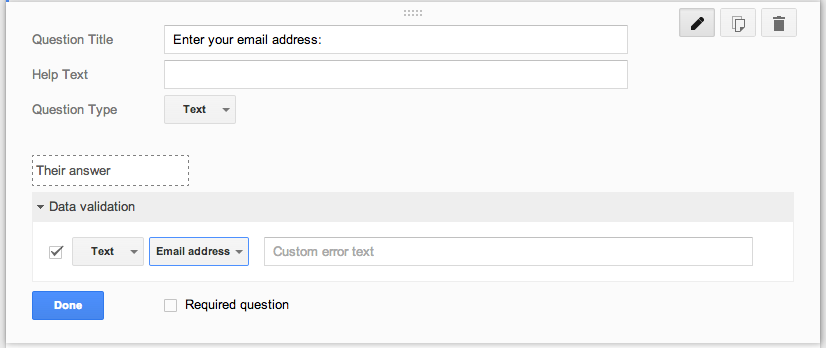
Below the short text response question, just click the Text Validation Drop Down icon and select the type of validation you require.
3. This next one seems simple enough, but I am over the moon excited: The Progress Bar!
Ok, no secret, I am a "little" long winded, and so my forms can get a bit creative...add in a few page breaks, and now a couple embedded videos, and people could start to worry, "Is this form ever going to end?" Today we have: The Progress Bar! Every form filler-outer will now know how much more they have to fill out before reaching the sweet sight of the Submit button.

4. Finally, your users will be able to see a custom message when the form is no longer "Accepting Responses." For educators, this will be a great way to open and close quizzes and online assessments. When the form is closed or no longer accepting responses, you can craft a message that let's your users know why it is closed and when it may be open again.

I was just so excited to get an unexpected update to one of my favorite Google Apps, I just thought I should climb up to the rooftop and spread the good news. Happy Googling.
Big Tickets!
But, Google and Grandma aren't just about the two times a year gifts. When G-ma swings through for a visit, she'll always let a crisp one dollar bill fall from her coin purse in the vicinity of any well behaved grandkid right when mom steps out of the room. In the same fashion, just when you weren't expecting it, Google swings through with an unplanned update and drops a couple freshly minted features right into your browser.
This week Google released four new features for the Google Forms App. Super slick!
1. You can now embed YouTube Videos in a Google Form! Wait, what?! Read it again and think of the possibilities! Have students watch a short video clip, then have them answer a couple multi-choice, checkbox, short text, paragraph text & scaled answers that all populate to your online spreadsheet!? This is going to be awesome!

It is super simple: just click insert Video...

And boom!
Text Validation will check to ensure that the email is at least configured correctly and notify the user if they have made an error before moving on.
Below the short text response question, just click the Text Validation Drop Down icon and select the type of validation you require.
3. This next one seems simple enough, but I am over the moon excited: The Progress Bar!
Ok, no secret, I am a "little" long winded, and so my forms can get a bit creative...add in a few page breaks, and now a couple embedded videos, and people could start to worry, "Is this form ever going to end?" Today we have: The Progress Bar! Every form filler-outer will now know how much more they have to fill out before reaching the sweet sight of the Submit button.

Just check the box that says - "Show Progress Bar at the Bottom of form Pages,"
And you are making progress!
4. Finally, your users will be able to see a custom message when the form is no longer "Accepting Responses." For educators, this will be a great way to open and close quizzes and online assessments. When the form is closed or no longer accepting responses, you can craft a message that let's your users know why it is closed and when it may be open again.
I was just so excited to get an unexpected update to one of my favorite Google Apps, I just thought I should climb up to the rooftop and spread the good news. Happy Googling.
Sunday, September 1, 2013
Creating a Google Form that Automatically Eliminates a Selection once it has been Selected
Ok, the title is not all that spicy, but the learning is legit! I am so excited about this Google Form Hack, I have used it a couple of cool ways and I think you will too. Quick story:
When I was at the Google Teacher Academy in Chicago this summer I watched a demo by a cat named +Jay Atwood , super nice guy and knows his way around automation. My ears perked up because as a high school principal and a life long slacker, I am always looking for ways to get more done with less effort. Jay mentioned that +Andrew Stillman, the author of like every super-cool Google Script imaginable, had created a particularly useable script named FormRanger. The script will take a list of items that you put in a spreadsheet and make these items the posible selections on a Google Form.
So, if you are new to all this lingo, imagine making an online survey (WebForm), and the answers to each question can change based on how other people answer the questions!?!
For example, you might want to put out a form to your staff asking everyone to choose a day & time to meet with you. Once one person selects a time, FormRanger will update the form and eliminate that selection: Thus no two people will get the same time-slot!
You could use this for all kinds of things! My wife uses it for a parent volunteer form, you could use it to create a wish list for parent donations and never get the same item twice, or kids could sign up to do book reports or presentations in class! I can imagine it being used for a potluck or any number of things.
So, I set out to try to build a form using FormRanger, super easy, but, no lie, I needed some help with the formulas on the spreadsheet to make it all work. Being the luckiest man alive (married to an amazing wife, I have a super cool job, etc.) I happen to work with +Geoff Lilley , the smartest database-daredevil and excel-super-wizard I have ever met. Thanks to him, I was able to put together this super useful Google Hack.
Take a look, give it a try, and come back and let me know how you were able to put it into action.
Link to Step By Step Directions
Monday, August 19, 2013
Learning to Code
It is never too late to learn. I tell my student this, my children, anyone who will listen. Today: I listened. A couple educators I know through this and that were starting an online book club of sorts - they all decided to enroll in a course at www.codeacademy.com and then meet back online to share what they'd learned.
Ok, first of all, this is some insane 21st Century evolution of my grandmother's knitting circle. My Grandma used to get together with her friends once a week and "Knit." I don't know that she ever finished as much as a sock in all the years she shoo'd us out of the house so, "the ladies could have some privacy." I was only 9, I had no idea why they needed privacy to knit, especially in the one room in the house with a TV, needless to say, I played outside. These 21st Century trail blazing educators aren't sitting around a room full of rocking chairs, they are logging in from all laptops all around the world, sharing a laugh over what they are learning in the cloud.
These educator friends of mine, not a one of them knows a thing about writing "Code." For those of you, like me, that didn't even know what Code meant, it refers to Computer Code: the language that allows our computers to make all the magic. So, I figure that if these characters are all going to jump in and become programmers, I think to myself, "Hey, I'm game to learn something new," so I go to the CodeAcademy, which is FREE, so my wife will allow it, and I enroll.
Within minutes, I am writing code. I click here, and type in some gibberish and out pops some cool dialog box that says, "Look Here." It reminded me of my old Commodore 64, plugged into my dad's TV in 1981. As I start to get down the rabbit hole of this coding thing, I start to get hooked. I can see the gibberish starting to make sense, I think I can finally see how those cats in the Matrix can see the girl in the red dress. Coding is just another language.
It was like a firecracker popped right there in my head. Boom! I get this!
Now, I only took one lesson, and I certainly didn't learn how to do much more than make my computer say hello, but I think I will stick around and see if this online knitting circle produces a sock. If you have an hour: go to the CodeAcademy: I am hoping to knit an entire sweater.
Ok, first of all, this is some insane 21st Century evolution of my grandmother's knitting circle. My Grandma used to get together with her friends once a week and "Knit." I don't know that she ever finished as much as a sock in all the years she shoo'd us out of the house so, "the ladies could have some privacy." I was only 9, I had no idea why they needed privacy to knit, especially in the one room in the house with a TV, needless to say, I played outside. These 21st Century trail blazing educators aren't sitting around a room full of rocking chairs, they are logging in from all laptops all around the world, sharing a laugh over what they are learning in the cloud.
These educator friends of mine, not a one of them knows a thing about writing "Code." For those of you, like me, that didn't even know what Code meant, it refers to Computer Code: the language that allows our computers to make all the magic. So, I figure that if these characters are all going to jump in and become programmers, I think to myself, "Hey, I'm game to learn something new," so I go to the CodeAcademy, which is FREE, so my wife will allow it, and I enroll.
Within minutes, I am writing code. I click here, and type in some gibberish and out pops some cool dialog box that says, "Look Here." It reminded me of my old Commodore 64, plugged into my dad's TV in 1981. As I start to get down the rabbit hole of this coding thing, I start to get hooked. I can see the gibberish starting to make sense, I think I can finally see how those cats in the Matrix can see the girl in the red dress. Coding is just another language.
It was like a firecracker popped right there in my head. Boom! I get this!
Now, I only took one lesson, and I certainly didn't learn how to do much more than make my computer say hello, but I think I will stick around and see if this online knitting circle produces a sock. If you have an hour: go to the CodeAcademy: I am hoping to knit an entire sweater.
Saturday, August 17, 2013
The March of the Portables
They have no idea...
Everyone has walked into a social event, maybe a party hosted by a friend or a little kid's birthday party, and immediately noticed that the host has put some amazing effort into getting the living room ready for company. I once attended a Halloween party where someone had dug a six foot grave in the backyard and filled it with steaming blocks of dry ice. People go to incredible lengths to impress their friends for a singular event. And why not? Every storefront, taco stand and corner bar clutters from corner to corner their walls filled with shock jock memorabilia, baja palm fronds and trendy tatterings with the purpose of drawing in the customers and creating an atmosphere conducive to coming back again some time.
This summer our district squeezed a few extra portables up against the back fence of a couple of our expanding schools. By the time the first bell rang, and the students stumbled up the ramps to their freshly carpeted learning laboratories, each room was meticulously crafted into a welcoming and warm second home to school aged children. What these students and their parents will never know is that just 72 hours prior to the opening bell, these well lit walls were homes to the sweatshop labors of teachers scrambling for their lives to get ready for the curtain to rise.
My father always told me, and please excuse my saying so on the internet, that, "The road to hell is paved with good intentions." This phrase was usually muttered at the teenage me when I was excusing myself for not finishing up something started or dropping the ball on a promise made. So, when our Maintenance and Operations department said that they would have these portables done in plenty of time for the teachers to move in before school started, I thought I could hear the faint sound of a paving stone settling into a long gravel road leading nowhere good.
Imagine, its 72 hours from the opening day of the NFL, and the players haven't been allowed on the field, can you imagine the quarterback getting out there to chalk the field lines? What if a new Starbucks was opening on the corner of Walk and Don't Walk in your town but 3 days before the shop opens, there is nothing: not a stick of furniture, no electrical, no air, nothing, do you think they'd be serving fresh brew by Monday morning? This was the case for our portable promised teachers just last week.
Three days before the children arrived, their was no power, no water, no air, no furniture, no...well, you get the picture. Then, just when it looked like all hope had been lost, the construction crew flipped on the power, handed out the keys and in marched an army of determined faces and tightly knit brows. Hell hath no fury...
Society credits teachers for their hard work, compassion and dedication to the further leaders of tomorrow, but I think the average citizen has no idea. I rolled up my sleeves to help my favorite 3rd Grade teacher, my wife, assemble her classroom. Six trips to the Learning Store, countless rolls of flame retardant paper, matching chevron border trim, IKEA shelves, IKEA curtain rods, IKEA cinnamon roll (that was for me), flame retardant spray over home made curtains, people have no idea, back pack hooks at just the right height, book boxes filled, organized, rearranged, refilled and reorganized.
The clock was ticking: tic, tic tic. Up went the bulletin boards, not straight enough, down they came, and then up again. The lamination machine in the front office pulled the wagon of trail blazing primary educators across the frontier of name tag creation, door placard designs and wall displayed work stations. A pedometer strapped to any of these hips would have worn out by the end of day two. Mothers and fathers, friends and neighbors all stopping by classrooms to pitch in. It was like watching a home makeover show and just as the students are moments from arriving, like a collective of satisfied bees having created a brilliant hive, the teachers buzz from room to room to admire the work of the collective.
Each room themed and colored to match, each unique and creative personality. One room brightly lit, another personal and homy, the next themed with prints and each brought to life by the woman standing at the center of it all. What they'll never know is that it is not the wall decorum nor the perfectly placed circle time carpet that eases the pain of the end of summer for the kids or comforts the hearts of the mothers delivering their perfect packages to their first day of school: it is them, the heroes, the women and men who would never think twice when sacrificing their lives, their time, and their energy to make perfect the first impression on those who will never notice the effort but will be forever changed because of it.
Subscribe to:
Posts (Atom)